
The Problem With Most Roadmap Slides
Most roadmap slides fail before the presenter says a word. They show a timeline with dates, boxes with milestones, and a color legend no one understands. The audience leaves the room unsure whether the project is on track, behind schedule, or just wishful thinking.
A roadmap slide has one job: show where you are, where you’re going, and why that path makes sense. Everything else is noise. Here’s how US business teams, product managers, and consultants actually build roadmap slides that get stakeholder buy-in.
What a Roadmap Slide Is Actually For
Before you open PowerPoint, get clear on the purpose. A roadmap slide is not a project plan. It’s not a Gantt chart. It’s a strategic communication tool. You’re not showing your team what to do — you’re showing decision-makers why the plan is credible and what they need to approve or support.
That distinction changes everything about how you design it. A project plan needs detail. A roadmap slide needs clarity. Strip out anything that serves the executor and keep only what serves the decision-maker.
The 4-Part Structure That Works
Every effective roadmap slide follows a version of this structure, regardless of industry or company size:
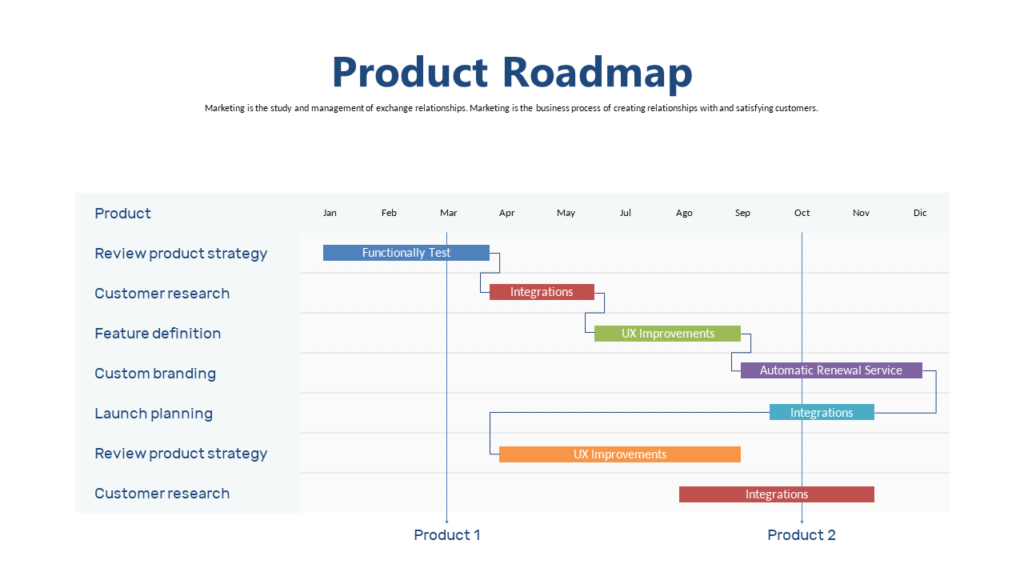
1. Time axis: Horizontal is almost always better than vertical. Left to right reads naturally for US audiences. Use quarters (Q1, Q2, Q3, Q4) rather than specific dates unless the dates are critical — quarters signal a plan, specific dates signal a commitment you may regret.
2. Swim lanes or phases: If you have multiple workstreams (product, marketing, operations), give each a lane. If it’s a single track, use phases instead — Discovery, Build, Launch, Optimize. Phases make the roadmap feel strategic rather than tactical.
3. Milestones: Mark the moments that matter — decisions, launches, reviews. Use a consistent visual marker (diamond, dot, flag) and label each one clearly. Three to five milestones is the sweet spot. More than that and the slide becomes a calendar.
4. Status indicators: Color code for current status — completed (green), in progress (blue or amber), upcoming (gray). Stakeholders read the color before they read the text. Make the status story unmistakable at a glance.
Common Mistakes US Presenters Make on Roadmap Slides
Too many milestones: If everything is a milestone, nothing is. Pick the moments that require a decision or signal a meaningful transition. Everything else belongs in the project plan, not the presentation.
Using exact dates when you don’t have them: “March 14” sounds precise. “Q1” sounds strategic. If your dates are estimates, use quarters. You’ll avoid the awkward conversation when March 14 comes and goes.
No “now” indicator: Your audience always wants to know where you are today relative to the plan. Add a vertical line or marker that shows the current date. It instantly answers the question everyone is thinking: are we on track?
Forgetting the headline: Your slide title should not say “Product Roadmap.” It should say something like “On track for Q3 launch — two key dependencies to resolve.” Tell them what to think before you show them the data.
Light vs. Dark: Which Theme Works for Roadmap Slides?
For boardroom presentations and executive decks, dark backgrounds with high-contrast text read better on large screens and projectors. For documents that will be printed or shared as PDFs, light backgrounds are cleaner. If you’re presenting live in a conference room, dark mode almost always looks more polished. If you’re sending the deck over email for async review, light mode prints and reads better on screens.
The practical move: have both versions ready and use the right one for the context.
Ready-to-Use Roadmap Slide Templates
Every layout described above — swim lanes, milestone markers, status color coding, Light and Dark themes, quarterly timelines — is available as a ready-made slide you can drop into any deck and edit in minutes.
- Browse Roadmap and Timeline Templates →
- Light + Dark themes, 6 color options, from $9
Need just one roadmap slide? Use Slide Picker to pick individual roadmap slides at $0.99 each. No subscription.